

Getting Started in Your Course
If this is your first UNHS course, reading this material will answer some of your questions about what our courses are like and what you should know before you begin. If this is your second or third course, be sure to review these directions for any changes or to refresh your memory.
Theorem is the UNHS online learning management system that can assist you in completing coursework. You can utilize Theorem to access course content, submit assignments, check your grades, and complete progress tests with your proctor.
How Will I Know What to Do?
As you proceed through a course, you will find directions that are easy to follow. At each step, you will be told exactly what to do next—what materials to study, what written work or activities to do, and when to take each test or evaluation. In Theorem, select the HELP icon in the main navigation for important documentation on how to use the learning management system. You will find information such as forms, policies, user tutorials, technology requirements, and contact information.
Why Should I Read the Course Introduction?
The Course Introduction in each course will help you get acquainted with the course before you begin to study. The Course Introduction begins with an explanation of why this course will be an important part of your learning. It also contains the course objectives, materials required for the course, information about the course organization, a description of the assignments and grading, some study suggestions, and a Progress Chart to help you keep track of your progress.
What is Expected of Me?
It is expected that you will spend approximately sixty to eighty minutes each day on each 5-credit course for a period of one semester (18 weeks)—about the same amount of time that high school students generally spend on each of their courses.
The Progress Chart, located in the Course Introduction, indicates approximately how much time it will take to complete each unit. If you want, you may take more or less time than is indicated. However, to finish a course in a semester, it will be necessary to follow the schedule closely. Note: It is recommended that you print and fill in the actual dates for when you intend to complete each unit.
Five weeks is the minimum time in which a course may be completed. You must complete all of the required activities and assessments in the sequence given in your gradebook. No more than one item may be submitted per day, per course. The final assessment will not be available until 5 weeks after the first submission, and all other required submissions have been received.
What Are the Responsibilities of My Proctor?
Your proctor is the person identified at the time of enrollment who will be responsible for securing and administering Progress Tests and supervising the submission of your answers to be evaluated. Your grades for the tests, as well as suggestions for improvement will be available through your proctor, who will give you access to this information for review and study.
What if I Need to Change My Address?
If you (or your proctor’s) name, address, or email address changes after you enroll in a course, please have your parent/ guardian or your proctor fill out and send a Student Information Form or contact customer service immediately.
What Will I Find in the Course?
The units in the course are made up of two or more lessons that focus on a portion of the unit topic. Each lesson has several components:
Performance Objectives: The objectives for each lesson tell you what you will be expected to learn in that lesson. You should use them as a study guide in order to concentrate on the most important points. You can also use these objectives as a review for the Unit Evaluations and Progress Tests.
Reading Assignment: If your course requires a textbook, lessons may contain a reading assignment from that textbook. As you read the assigned material in the textbook, keep the performance objectives for the lesson in mind to help identify the most important material in the assignment.
Lesson Content: This section serves many functions. Some parts of the instruction elaborate on the information in your textbook. Other parts summarize or analyze the information to help you better understand an important point. To successfully complete the material for a unit, you must understand the information given in the course materials as well as the material in the textbook.
How Do I Get Around in the Online Course?
The left-hand navigation panel within Theorem displays the course outline, which is available from every course page, and makes it easy to “turn” your course pages. Just Click the Unit, Lesson, and Topic you want to read.
What Types of Assignments are Included?
An overview of the assignments and assessments in this course is provided in the Course Introduction. You will find specific instructions in each unit telling you when to do each assignment and how to submit it for grading, if appropriate. The following section contains short descriptions of the types of assignments that may be included in your UNHS course. You can access your required assignments and graded assessments from your Course Gradebook.
Non-graded Assignments
Self-Checks: At the end of each lesson or section of content you will complete a self-check activity to measure your understanding of the content presented. As you complete the activity, review the answers that are provided. You can complete the activities as many times as you like to help prepare for the graded Unit Evaluations and Progress Tests.
Skill Builder Activities: Your course may contain practice exercises, problems, thought questions, laboratory activities, or other types of non-graded assignments that will help you enhance your understanding of the course content. You may print these pages to answer the questions or you may answer them directly in your course and save your responses. Either way, keeping these pages or files for future reference and review will help you prepare for the graded assessments.
Teacher Connect Activities: Your course may contain Teacher Connect activities. These activities provide you with an opportunity to exchange information with your teacher about course content, ask questions, get in-depth explanations to specific questions, prepare for Projects, Evaluations, and Progress Tests, and delve more deeply into topics of interest. The Teacher Connect activities are not graded, but satisfactory completion and submission of the activities is required in order to receive credit for your course. Note: For a selection of NCAA-approved courses, Teacher Connect activities are counted as graded components that will be factored into a student’s overall course grade.
Graded Assessments
Open-book Unit Evaluations: At the end of every unit is a Unit Evaluation that is unsupervised and “open book.” You may use your online course content, print course content, textbook, or any other course materials when you are taking the Unit Evaluations. Unit Evaluations may contain multiple-choice, matching, identification, or true/false types of questions. Note: It is recommended that you print out unit evaluations and use them as study guides, filling them in as you move through the units.
Submitting Unit Evaluations: You can access your evaluations through the Unit Evaluation page in your online course, through your Course Gradebook or by the left-hand navigation panel in Theorem. Print your Unit Evaluation first, circle your answers, and then record your answers to the questions on the evaluation online. Be sure to save your answers often. When you have finished, check over your work to see if you need to make any corrections. When you feel confident that your answers are correct, click the SUBMIT ASSIGNMENT button. Your evaluation will be graded immediately and recorded in your Course Gradebook by Theorem.
Projects: Projects will give you an opportunity to develop your own interpretations of the course material by applying what you have learned to your own experiences. You should use your course material (printed or online course content), textbook, notes, or any other materials as aids when doing the Projects. Projects should demonstrate your own original work. Note: Not all courses contain Projects.
Submitting Projects: You can access your Projects through the Project page in your online course, through your Course Gradebook, or through the left-hand navigation panel in Theorem. It is highly recommended that you download or print the Project files and complete your work on a copy that is saved to your personal hard drive. Upon completion, you will upload your work to the Project submission page. Note: If you have paid for mail processing, and you are submitting your Project using postal mail, be sure to include a Lesson Wrapper, found on the Forms & Policies of the UNHS website, to ensure that all the required information gets to your UNHS teacher.
Progress Tests: Progress Tests are examinations that are similar in form to the Unit Evaluations; that is, they consist of objective-type questions. Progress Tests MUST be completed and submitted for grading under the supervision of your proctor. During these closed-book examinations, you will NOT have access to the textbook or any course materials or notes.
Procedures for taking Progress Tests: In order to maintain the integrity of our tests, we require you to go to your proctor to complete your tests and to submit your answers. Your proctor will give you a paper copy of the test to complete. If you submit your answers online using Theorem, your proctor must type in a “proctor code” before the system will accept your answers. If you have paid for mail processing, you may fill out a scan card and mail it to the high school for grading. Your proctor must sign and date the scan card before it is mailed. Your proctor will keep the original test on file and will destroy all paper tests after you complete the course. Although you may view your grade in the Course Gradebook section of your course, results and instructional comments for your test will be available from your proctor.
What Grading Scale is Used?
The University of Nebraska High School uses the following grading scale:
| Letter Grade | Percent Scale | Grade Scale | AP® Grade Scale |
|---|---|---|---|
| A+ | 98-100 | 4.0 | 5.0 |
| A | 93-97 | 4.0 | 5.0 |
| B+ | 90-92 | 3.5 | 4.5 |
| B | 85-89 | 3.0 | 4.0 |
| C+ | 82-84 | 2.5 | 3.5 |
| C | 77-81 | 2.0 | 3.0 |
| D+ | 74-76 | 1.5 | 1.5 |
| D | 70-73 | 1.0 | 1.0 |
| F | 69 or below | 0.0 | 0.0 |
Instructions for Submitting Your Work Online
To log in to Theorem, visit highschool.nebraska.edu and select the “Theorem” button in the red navigation menu at the top, or the “Theorem” link in the page footer. Enter your username and password.
- Click the Course Gradebook icon on the Course Card or the course name.
- Click START or RESUME to begin working on an individual graded assignment, which may be a Teacher Connect, Unit Evaluation or Project. You should print the page and work on the evaluation or Project on paper. You will be given directions for completing the assignment for submission. You can save your work at any time by clicking on the SAVE ASSIGNMENT button. For Projects, you can preview your uploaded work by clicking on the DOWNLOAD FILE button.
- Progress Test online answer sheets are also accessed in the Course Gradebook. When you are ready to take a Progress Test, you must schedule an appointment to have your proctor give you the test and assist you with online submission.
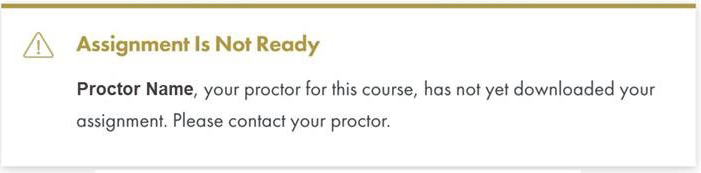
- If you have NOT made an appointment with your proctor and you click on a Progress Test in the left-hand navigation panel, you will be given the following instructions:
- When you are ready to submit your work for grading, click the SUBMIT ASSIGNMENT button. Open-book evaluations and closed-book Progress Tests will be graded immediately and recorded in your Course Gradebook. For Progress Test feedback, please make arrangements with your proctor.
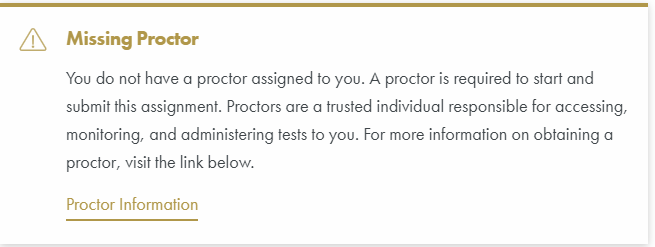
- In the event that you do not have a proctor assigned to you, if you click on a Progress Test, the following message will appear:
Anything Else?
You should establish a safe place for your course materials, so they are not lost or destroyed.
After each Unit Evaluation and Project, a report about your submitted work will be available to you. You should keep the reports to use in your review.
Make sure to save a copy of your project in a place other than Theorem (such as USB drive, cloud storage such as Google Drive, etc.).
After each Progress Test is graded, your grade is available via Theorem, and a report about the test will be available for your proctor (either electronically or by postal mail). Your proctor will allow you a reasonable length of time to study the comments. Your proctor will then file the Progress Tests and the grade reports. At any time, you may review your tests in the presence of your proctor.